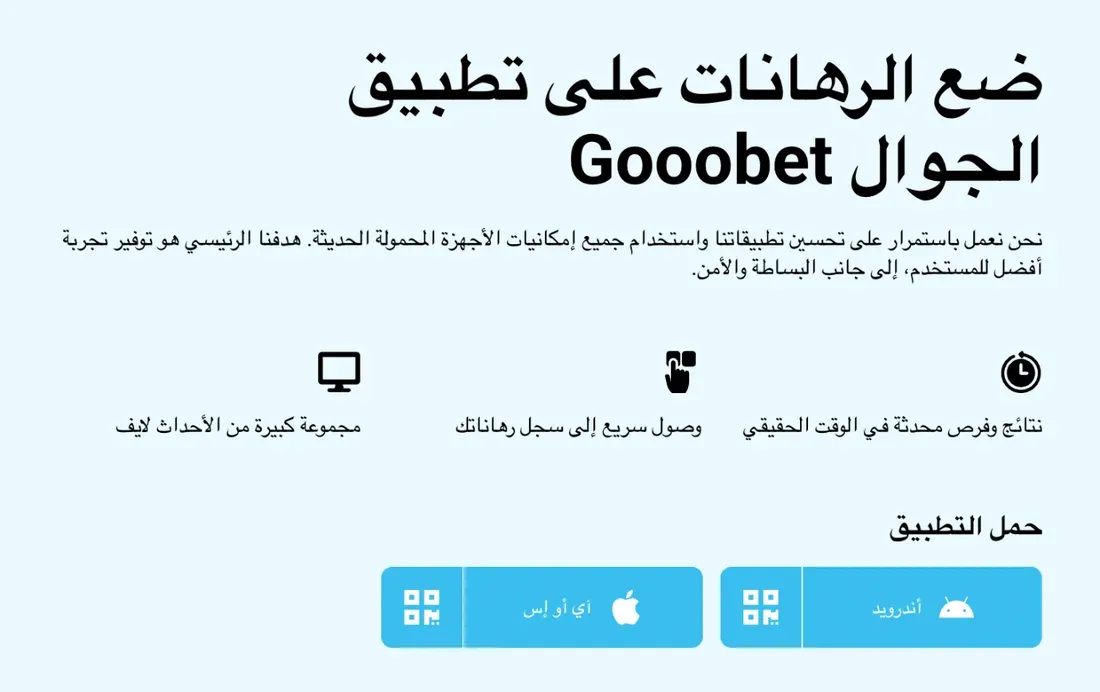
Which download method suits your phone?
The official gooobet mobile page offers three methods, each with different requirements. Pick one from the table before you start:
| Method | Device | Where from? | Best if you |
|---|---|---|---|
| goobet apk | Android | Official mobile page (not Google Play) | want an installed app with a permanent icon |
| TestFlight | iPhone | Invite link on the official mobile page | use an iPhone and prefer an installed app |
| PWA (no download) | Android & iPhone | Your browser | have little storage or don’t want to install files |
goobet apk download on Android
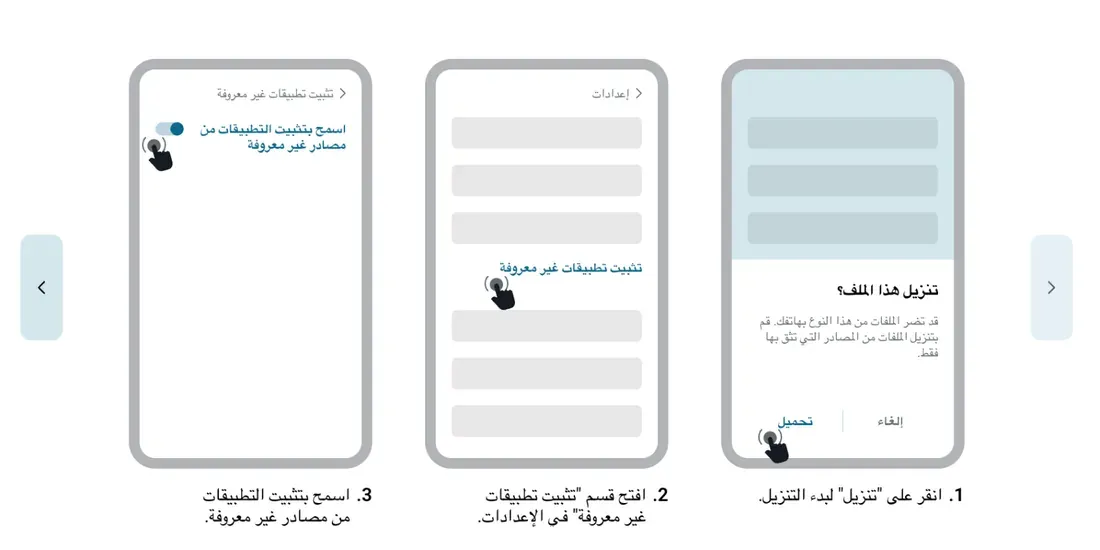
The Android version doesn’t come from the store, so your phone will ask for one extra permission. The steps as shown on the official page:
- Open the official mobile page in your phone’s browser (Chrome, for example).
- Tap the Android download button. If a warning says the file may be harmful, that is a generic warning for all APK files; continue only if the source is the official page.
- Go to Settings → Security or Apps → “Install unknown apps” and allow the browser you downloaded with.
- Open Gooobet.apk from your Downloads folder and tap “Install”.
- Open the app, log in, then switch the unknown-sources permission off again.
goobet on iPhone via TestFlight
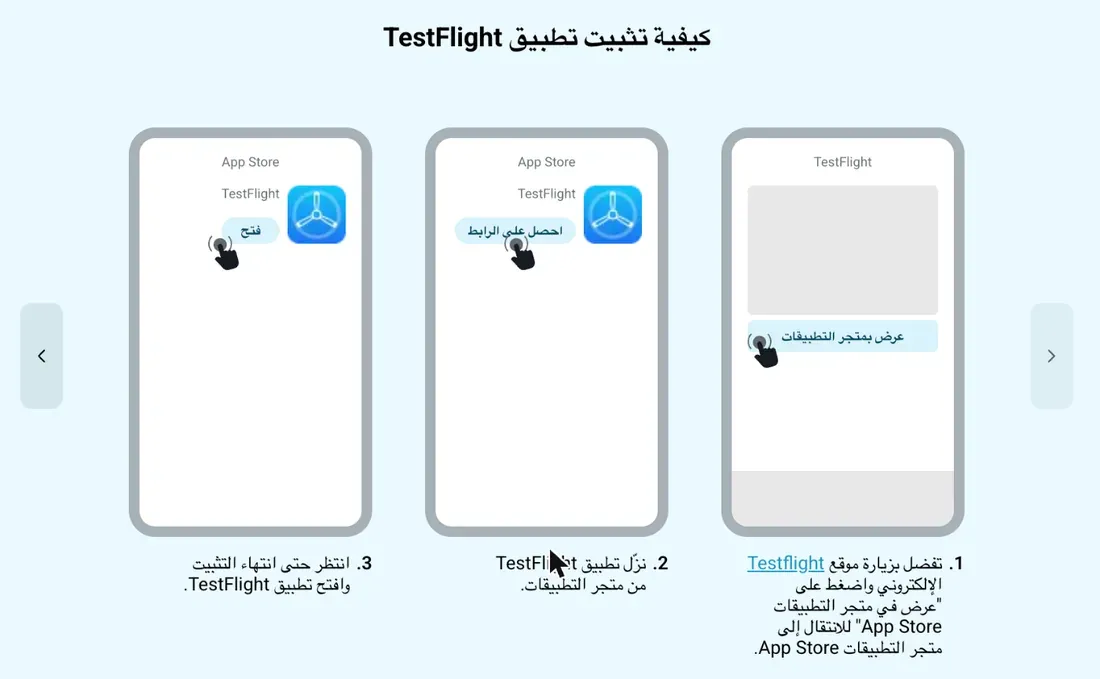
There is currently no goobet app in the App Store. The official alternative is TestFlight, an Apple app used to install apps outside the store.
- Install TestFlight from the App Store (free).
- Open the official mobile page on the same iPhone and tap the iOS link.
- TestFlight opens; tap “Accept”, then “Install”.
- Open the app from your home screen and log in.
TestFlight links expire on a schedule set by the platform. If you see “invite not available”, go back to the official page for the current link rather than hunting for one in Telegram groups.
goobet without a download (PWA)
This is the lightest option and works on both Android and iPhone because it only needs a browser:
- iPhone (Safari): open the site → Share → “Add to Home Screen”.
- Android (Chrome): open the site → three dots → “Add to Home screen” or “Install app”.
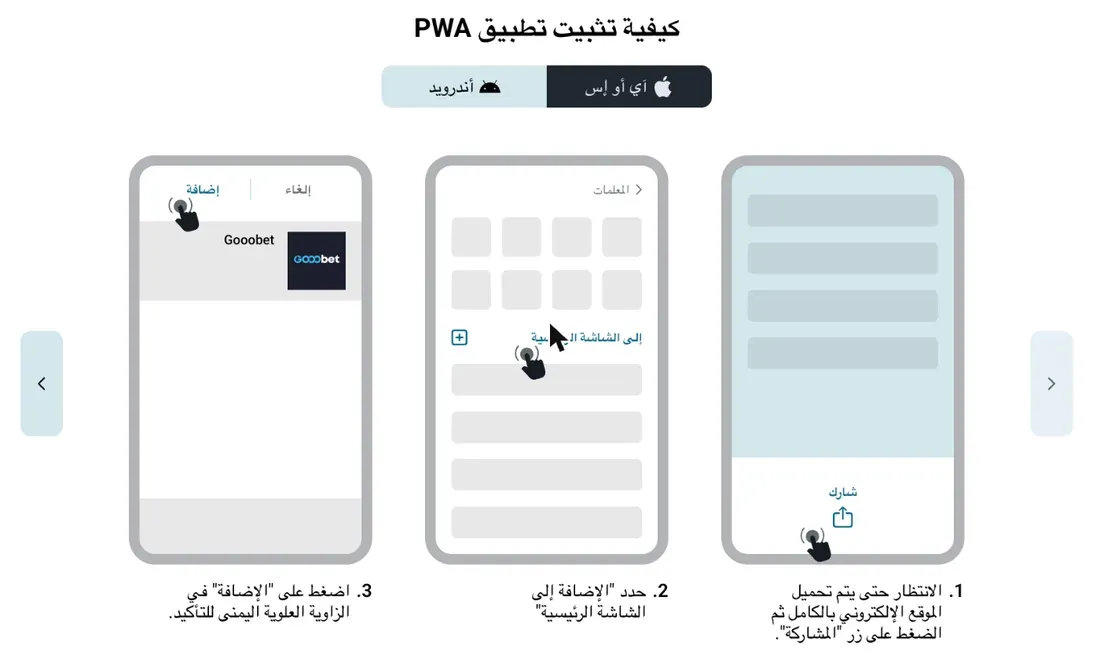
The advantage: no manual updates and no unknown-sources permission, because the icon always opens the current version of the site.
Before you download: four quick checks
- The only source for the file is the official mobile page; ignore any goobet apk sent over WhatsApp or Telegram.
- The app is free; never pay anyone for a “VIP” or “modded” version.
- If a file asks for permissions unrelated to betting, such as reading your messages, stop and check it really came from the official page.
- You must be 18+, and your first test amount should be money you can afford to lose.
What’s inside the app?
The app and the PWA show the same sections as the website, on the same account:
- Sports betting, pre-match and live.
- The casino with slots and live tables.
- Aviator and crash games.
- Deposits, withdrawals and bet history (deposit methods for Egypt are in this article).
Common problems after downloading and how to fix them
“Install blocked” on Android
The unknown-sources permission is off for the browser you used. Enable it for that browser, then open the file again.
“There was a problem parsing the package”
The file is incomplete or outdated. Delete it and download it again on a stable connection.
TestFlight says the invite has expired
Open the official page on your iPhone and tap the current link; old links stop working.
The app is slow or freezes
Free up storage and try another network, or use the PWA for now since it is lighter.
After installing: log in or create an account, then read the offers and their terms before your first deposit.